Solitaire Pal: Big Card
- 4.8
- Rating
- 500.00K
- Installs
- Free
- Price
 Analysis by App-foxy
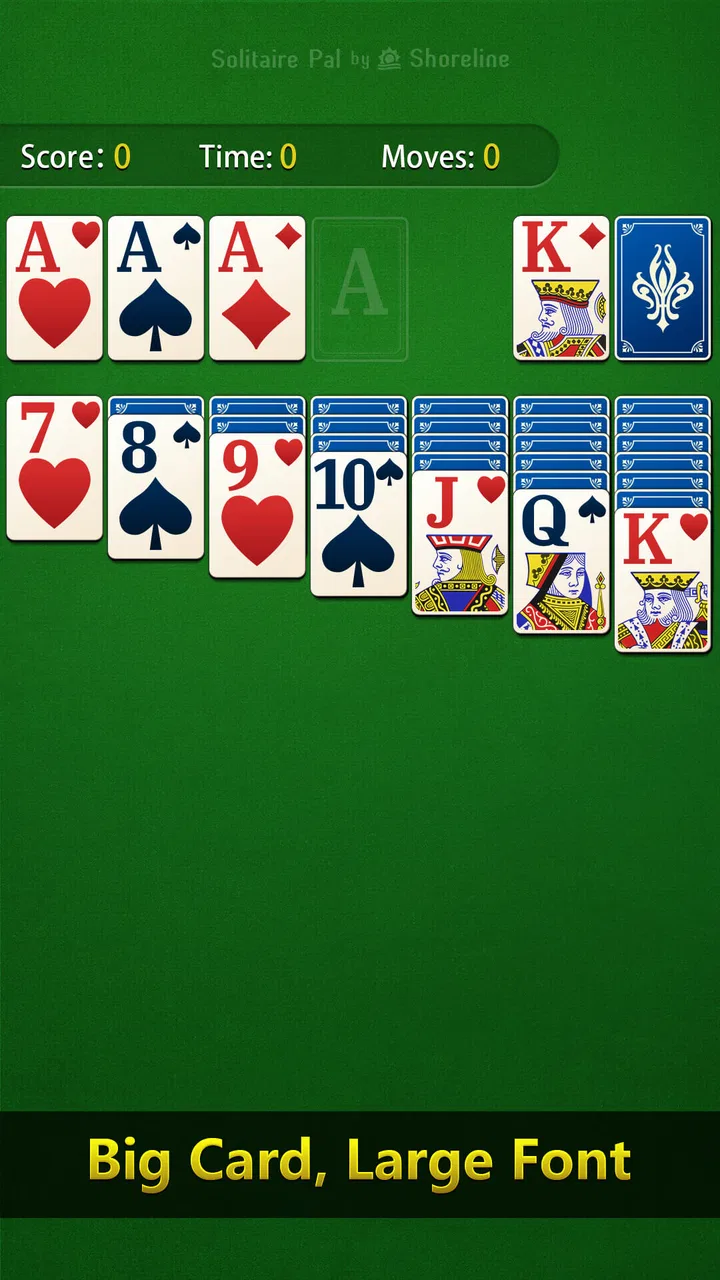
I reach for Solitaire Pal: Big Card when I want a quiet card game that works well in short bursts and does not ask me to learn a complicated ruleset. It is a free solitaire game from Shoreline Park, Inc., built for Android devices and aimed at the familiar experience of arranging cards one move at a time. The large-card focus makes its identity clear: this is meant to be easy to read and comfortable to play, especially when I am using a phone casually rather than settling in for a long gaming session.
After spending time with it, I see the strongest appeal in its simplicity. It is not trying to replace a competitive card platform or become a deep strategy game. Instead, it gives me a straightforward way to fill a few minutes, work through a puzzle, or keep my hands busy while taking a break. The daily-puzzle angle adds a reason to return, while the classic solitaire format keeps the learning curve almost nonexistent.
How Solitaire Pal: Big Card fits into everyday shared use
A realistic household use case is a shared tablet or a phone that different people pick up at different times. One person might play a round while waiting for an appointment, another might use it during a quiet evening, and someone else may simply want a familiar game without installing a large, demanding title. That flexibility suits this particular card game because a solitaire round is naturally individual and does not require coordinating with another player.
You May Also Like

 Blood Strike: 2.5 Anniversary
Blood Strike’s Loadouts Turn Every Drop Into a Tactical Gamble
A close look at Blood Strike’s custom loadouts: how fast access to signature weapons reshapes its battle royale rhythm, rewards preparation, and narrows the gap between fights.

 Pandora - Music & Podcasts
Pandora’s Music Is Easy to Start, but Harder to Recover
Pandora’s strength is its low-effort path from a seed to a station. Its weak spot is how much confidence it asks you to place in connection, setup, and quiet recovery.

 8 Ball Pool
 Is Built on Rivalries, Rematches, and Routine
A close look at the rivalries, rematches, shared routines, and unanswered safety questions that turn a quick pool match into a persistent mobile community.

 Samsung Music
’s Quiet Strength Is Playing What You Already Own
Its reach comes less from spectacle than from dependable access to a personal library. That simplicity is both the app’s strongest retention engine and its ceiling.

 AccuWeather: Weather Radar
AccuWeather Review: A Quick, Clear Forecast for Everyday Decisions
For everyday plans, the best forecast is the one you can understand quickly. AccuWeather makes rain timing, radar, and local conditions easy to act on, with a few trade-offs.

 Hill Climb Racing
Why Hill Climb Racing Still Turns Crashes Into One More Run
A tiny car, a bumpy hill and one more upgrade: Hill Climb Racing keeps resurfacing because its simple chaos makes every near-miss feel personal.
More From Our News Desk



I also like that the game can occupy a different role from more social apps. If two people are sharing a device, there is no need to arrange a match, create a room, or wait for an opponent. The next person can open the game and play at their own pace. That makes it a practical choice for a household where the device is passed around, although it also means the experience is personal rather than collaborative.
The large-card presentation is especially relevant in a shared-use setting. On a phone held farther away, or on a tablet used by someone who prefers clearer visual elements, card readability matters more than flashy decoration. I found that the format makes the central action easier to understand at a glance. It is a small design choice, but it changes whether a quick game feels relaxing or unnecessarily tiring.
There is a useful trade-off here. The same focused layout that helps readability can make the game feel less exciting to someone looking for animated effects, elaborate themes, or a strong sense of progression. I would recommend it to a household that values clear, familiar play over spectacle. I would not choose it as the main game for people who expect a constantly changing multiplayer experience.
A calm game for short sessions
Solitaire works particularly well in the gaps between other activities. I can start a round without committing to a campaign, and the basic rules are familiar enough that I do not need a tutorial every time I return. The daily puzzles give those brief sessions a little structure: instead of opening the game with no particular goal, I have a specific challenge to consider.
My practical tip is to treat the daily puzzle as a focused exercise rather than something to rush through. I look for moves that reveal hidden cards before automatically moving every available card to a foundation. That habit is useful in classic solitaire generally, but the daily format makes it easier to turn a casual round into a small routine. It also helps me notice when I am making progress through planning rather than simply tapping obvious moves.
For someone using a shared device, this routine has another advantage: the game can be picked up and put down without needing a group schedule. The limitation is that solitaire remains a solitary activity. If the household wants a game that encourages conversation or shared decisions, a tabletop card game or a multiplayer app would be a better fit.
What to sort out before handing over the device
Because this is an individual card game, I would not assume that several household members will have neatly separated personal spaces inside it. Before passing the device around, I would decide whether everyone is comfortable using the same visible game environment. A daily puzzle, an unfinished round, or a personal playing habit may be easy for another person to encounter simply because the device itself is shared.
This is not a criticism of the card format; it is a reminder about shared-device boundaries. If one person treats the game as a private daily routine, a shared tablet can blur that routine. My advice is simple: agree on whether people should continue an existing round or start their own, and avoid treating another player’s in-progress board as something to “fix.” Solitaire is more enjoyable when each person can make their own decisions.
I would also keep expectations modest around coordination. The game is suitable for taking turns with the device, but not for building a synchronized household activity. There is no reason to wait for another person before playing, which is convenient, yet there is also no built-in reason for two people to compare their decisions during the same round. If coordination is important, the household will need to create that structure itself, perhaps by setting aside a short time to compare approaches after each person has played.
That limitation can actually be useful for families or roommates who have very different schedules. Nobody has to be online at the same time, and nobody is disadvantaged by missing a session with another player. I see it as a good “passive shared” game: one device, several independent players, and no pressure to keep pace with anyone else.
Age context and trust when others use it
The Everyone age rating matches the straightforward nature of the experience. I would feel comfortable presenting it as a simple card option for a broad household audience, especially for someone who already understands classic solitaire. The rules are more important than reflexes, and the large-card emphasis can make the board approachable for people who find smaller card interfaces frustrating.
Still, an age rating should not replace ordinary device supervision. If a child is using a shared phone or tablet, I would establish the same boundaries I use for any installed app: who may use the device, when it is available, and whether other people’s unfinished activities should be left alone. Those are household decisions rather than qualities I would attribute to the game itself.
Trust matters more than competition here. Since solitaire is normally played alone, there is little reason for one person to interfere with another person’s choices. On a shared device, however, a curious user might tap through a board or begin a new round without realizing that someone else intended to return to it. A quick family rule—leave an active game untouched unless the owner says otherwise—prevents most of that friction.
I would choose this game for a mixed-age household that wants a recognizable card activity without complicated social interaction. I would skip it as a child-focused entertainment choice if the goal is guided learning, creative play, or cooperative interaction. The Everyone rating tells me the content is broadly suitable; it does not make the game educational or turn it into a family multiplayer title.
Playing style, daily puzzles, and the limits of the classic format
The core experience is deliberately familiar. I arrange cards according to the usual solitaire logic, reveal opportunities, and decide whether a move improves the board or merely looks convenient. That familiarity is the biggest strength for returning players. I can concentrate on planning instead of learning a new system, and I can hand the phone to someone else without explaining a long list of rules.
The daily-puzzle element gives the standard format a useful sense of direction. A normal solitaire game can become repetitive when I play only to pass time, but a daily challenge encourages me to think about a particular board and return consistently. My recommendation is to use it as a mental reset: play slowly, reconsider blocked columns, and avoid assuming that the first available move is automatically the best one.
One non-obvious benefit of this style is that it rewards restraint. In many quick mobile games, tapping rapidly is the easiest way to make progress. Here, pausing before moving a card can be the smarter choice because a seemingly harmless action may reduce future options. That makes the game more satisfying for me than a purely automatic card animation, even though the overall presentation remains uncomplicated.
The downside is equally clear. Players who want a wide selection of modes, a strong competitive ladder, or a large collection of card variants may find the experience narrow. A dedicated solitaire collection could offer more variety, while an online card platform would be better for direct competition. I prefer Solitaire Pal: Big Card when I want one clear activity, not when I want a complete catalog of card games.
It also helps to approach the daily puzzles with the right expectations. They add a repeatable reason to open the app, but they do not transform solitaire into a story-driven adventure. The satisfaction comes from solving the board and improving my decision-making, not from unlocking a world or following characters. That distinction is important for anyone comparing it with broader casual-game apps.
Reading the board and avoiding careless moves
My most useful workflow is to scan the columns before making the first move. I check which face-down cards might be exposed, identify spaces that could accept a useful sequence, and consider whether moving a card to a foundation is genuinely helpful. This takes only a moment, but it reduces the feeling that I am playing by instinct alone.
I also avoid emptying a column simply because an empty space looks valuable. An open column is most useful when I have a suitable king sequence ready to place there; otherwise, I may gain visual space without gaining practical options. That is the kind of small trade-off that makes the game more thoughtful than its relaxed presentation suggests.
When I am playing on a shared device, I would not use another person’s round as a practice board without asking. A better arrangement is for each player to start a fresh session when possible and treat the daily puzzle as a common topic rather than a shared object. One person can explain why they chose a move, while the next person can try the same board independently. That creates coordination without pretending the app is a cooperative game.
Another useful habit is to stop when the session stops being relaxing. Solitaire can tempt me to keep replaying a difficult board simply because I am close to a solution. In a short-break setting, that can turn a calming activity into a source of irritation. I get more value from leaving the game and returning later than from tapping randomly until the board becomes worse.
Installation, device fit, and practical expectations
The game is free, which makes it easy to try without turning the decision into a financial commitment. It has reached over one hundred thousand installs and holds a 4.9 average from around eighteen thousand ratings, so it has clearly attracted a substantial audience for this focused style of solitaire. I read those figures as a sign of strong user satisfaction, while still remembering that a high rating cannot tell me whether the visual style suits my own preferences.
It was released on November 25, 2022, and the current version is 1.8.0.20260224. The stated minimum requirement is Android 6.0, so it is positioned to work with a wide range of Android hardware rather than only recent phones. That is helpful for a household using an older spare device, though the actual comfort of play will still depend on the screen size and general condition of that device.
My advice before installing it on a shared phone is to consider who will be holding the device and how far away they normally sit from the screen. The large-card approach is most valuable when it improves real-world readability. On a small, bright display, it may feel immediately comfortable; on a tablet, it may be even easier for multiple household members to inspect the board, although solitaire itself remains a one-player activity.
I would also explain the free price clearly to anyone else using the device: free makes the initial download accessible, but it does not tell me everything about how every future interaction will feel. I would let the person who will actually play decide whether the presentation is comfortable rather than assuming that no-cost automatically means universally suitable.
Who should choose it, and who should look elsewhere
I recommend this game to people who want classic solitaire with a readable, uncomplicated presentation and a reason to return through daily puzzles. It is a sensible choice for quiet breaks, older Android devices, casual solo play, and households that share a device without needing everyone to play together. The broad age rating also makes it an easy candidate when the household wants a low-pressure card game that does not depend on a narrow audience.
I would especially suggest it to someone who feels overwhelmed by busy mobile-game menus. The focused concept means I can open it with a clear idea of what I am there to do. That clarity is more valuable than it sounds when I only have a few minutes and do not want to sort through events, characters, upgrades, or competitive systems.
I would skip it if I wanted head-to-head play, voice interaction, a large multiplayer community, or a broad collection of card rules in one installation. A more feature-heavy solitaire suite would provide more variety, and a physical deck would be better for genuine shared play around a table. Someone who dislikes repeating a familiar ruleset may also run out of novelty sooner than a dedicated solitaire fan.
For me, the deciding question is not whether this is the most feature-packed card game. It is whether I want a dependable, readable solitaire session without unnecessary complexity. When the answer is yes, the game does its job well. When I want social competition or a richer progression system, I would choose a different category of app rather than expecting this one to become something it was not designed to be.
My household verdict
After considering both solo use and shared-device habits, I see Solitaire Pal: Big Card as a strong fit for calm, independent play. Shoreline Park, Inc. keeps the idea focused on the card board, and that focus is exactly why it works for quick sessions. The daily puzzles add a modest routine, while the large-card presentation makes the central action approachable for a broad audience.
The best way to use it in a household is to treat it as a turn-taking activity, not a coordinated multiplayer game. Set simple boundaries around unfinished rounds, let each person make their own decisions, and use the daily puzzle as a conversation starter if people want to compare strategies. That approach respects the game’s individual nature while still making a shared device workable.
My honest recommendation is to install it when clarity and quiet replayability matter more than variety. It is free, broadly accessible, and well suited to a few thoughtful minutes at a time. Its limitations are real: the format is solitary, the feature set is intentionally focused, and it will not satisfy players seeking competition or constant novelty. For the right household, though, those limits are also the reason it feels easy to pick up and trust as a simple everyday card game.
FAQs for Solitaire Pal: Big Card
01What features make Solitaire Pal: Big Card stand out from other solitaire apps?
Solitaire Pal: Big Card offers a unique experience with its large, easy-to-read cards, making it ideal for players who prefer a clear view. It includes multiple game modes, daily challenges, and customizable themes. Additionally, it provides an intuitive interface with smooth touch controls, enhancing the overall gameplay experience.
02Is Solitaire Pal: Big Card suitable for beginners and advanced players?
Absolutely! Solitaire Pal: Big Card is designed to cater to both beginners and advanced players. Beginners can enjoy the simple and intuitive tutorials, while advanced players can challenge themselves with complex game modes and daily challenges. The app also offers hints and undo options to help players improve their skills.
03Does Solitaire Pal: Big Card require an internet connection to play?
No, Solitaire Pal: Big Card can be played offline. This allows users to enjoy the game anytime and anywhere without needing an internet connection. However, to access certain features like leaderboards or daily challenges, an internet connection will be required.
04Are there in-app purchases in Solitaire Pal: Big Card?
Yes, Solitaire Pal: Big Card includes in-app purchases. While the core game is free to play, users can purchase additional themes, card backs, and power-ups to enhance their gaming experience. These purchases are optional and not necessary to enjoy the full core gameplay.
05How does the app ensure user data privacy and security?
Solitaire Pal: Big Card takes user privacy and security seriously. The app adheres to strict privacy policies and does not share personal information with third parties. It uses encryption to protect user data and ensures compliance with relevant data protection regulations, providing a safe gaming environment.
Pros
- Intuitive interface for easy navigation.
- Large cards enhance visibility and gameplay.
- Multiple game modes to keep it engaging.
- Offline play available
- no internet needed.
- Customizable themes for a personal touch.
Cons
- Ads can be intrusive during gameplay.
- Limited free hints without purchase.
- No multiplayer option available.
- Occasional app crashes reported.
- In-app purchases can be pricey.

Solitaire Pal: Big Card
Gallery